

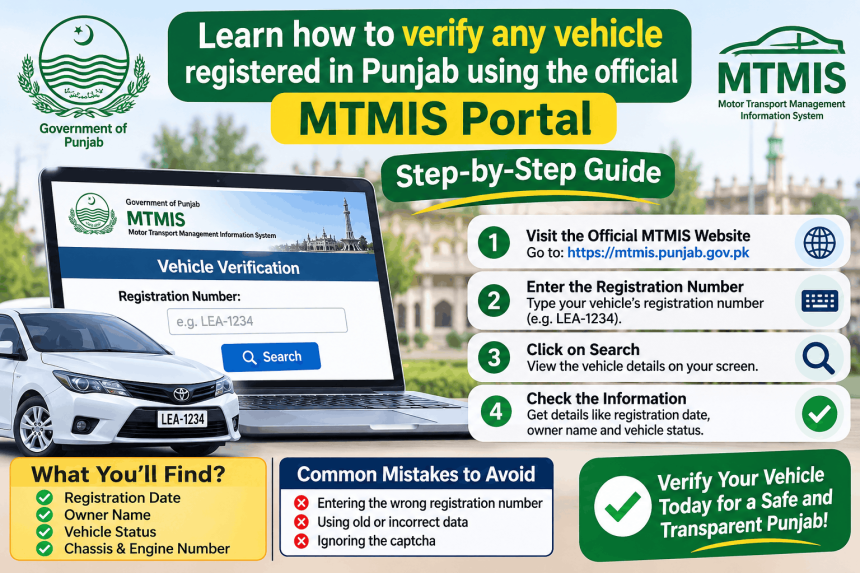
You can verify any vehicle registered in Punjab for free using the official MTMIS Punjab portal. The website is mtmis.excise.punjab.gov.pk, and it requires two details: the vehicle’s registration number and its registration date . You also need to enter a picture code (captcha). This check shows you the official owner record, engine and chassis numbers, and token tax status. It is the safest way to confirm a vehicle is genuine before buying it. This guide explains the exact steps, what to do if the portal does not work, and the scams to avoid.
What Is MTMIS Vehicle Verification?
MTMIS stands for Motor Transport Management Information System. It is the official vehicle registration database of the Punjab Excise, Taxation and Narcotics Control Department, built by the Punjab Information Technology Board (PITB) . The public verification page lets you look up a vehicle’s official record using details from its registration papers.
Important: The old website address, mtmis.punjab.gov.pk, no longer works. The correct address is mtmis.excise.punjab.gov.pk .
What You Need Before You Start
You cannot check a vehicle with just the number plate. To protect privacy, the system now requires two details together .
-
Registration Number: Type it exactly as it appears on the number plate. The portal shows examples like LXZ 123, LXZ 0123, or LXZ-07-1111 .
-
Registration Date: This is the date the vehicle was registered, which you can find on the registration book or smart card. You must pick it from the calendar on the page .
-
Picture Code (Captcha): Type the letters or numbers shown in the image.
Step-by-Step: How to Verify a Vehicle Online
Follow these steps carefully.
Step 1: Open the Official Portal
Go to mtmis.excise.punjab.gov.pk in your browser. Type the address yourself. Do not use links from WhatsApp or social media .
You can also go to the main Excise website (excise.punjab.gov.pk) and click on “Online Verification of Registered Vehicles” to reach the same page .
Step 2: Enter the Registration Number
Type the vehicle’s registration number in the first box. Check the spelling and spacing against the number plate .
Step 3: Select the Registration Date
Click the calendar icon and choose the date the vehicle was registered. This date must match the registration papers exactly .
Step 4: Enter the Captcha
Type the picture code shown on the screen. This is a security step to stop automated searches .
Step 5: Press Search
Click the Search button. The system will look up the record.
Step 6: Read and Compare the Result
The screen will show the vehicle’s official details. Compare them carefully with the seller’s papers and with the vehicle itself.
The record can include:
-
Owner’s Name (registered owner)
-
Chassis Number and Engine Number
-
Make and Model
-
Registration Date and Registration Authority
-
Token Tax Status (paid or unpaid)
-
Vehicle Type and Engine Capacity
What to Do If the Portal Does Not Work
The MTMIS portal has had technical issues in the past. Here are your options.
Check the address again. Make sure you are on mtmis.excise.punjab.gov.pk. The old address will not open .
Try the SMS service (if it works). Some guides say you can send the registration number by SMS to 8785 to get the record. However, this service could not be confirmed as working in September 2026, so do not rely on it .
Call the Excise Helpline. The official helpline is 0800-08786 . Call them if the website is down or if you cannot find a record that you believe should exist.
Visit an Excise Office. If you need an urgent verification and the online system is not working, you can visit your local Excise and Taxation office in person.
Common Mistakes to Avoid
Using a fake website. Many private websites use “MTMIS” in their name but are not official. They may charge a fee or collect your data. Only use the .gov.pk address .
Paying for verification. The official MTMIS check is free. Do not pay any agent or website to “unlock” vehicle details .
Entering the wrong date. The registration date must match the papers. If you guess, the system will not find the record.
Ignoring a mismatch. If the chassis or engine number on the record does not match the vehicle, do not buy it. This is a major red flag .
Sharing the record publicly. The record contains the owner’s personal details. Do not share screenshots or use the details to contact the owner .
Frequently Asked Questions
What is the official website for vehicle verification in Punjab?
The official portal is mtmis.excise.punjab.gov.pk. The old address, mtmis.punjab.gov.pk, no longer works .
Can I verify a vehicle with just the registration number?
No. Since a privacy update, the portal requires both the registration number and the registration date from the vehicle’s papers .
Is vehicle verification in Punjab free?
Yes. The MTMIS verification check is completely free. Do not pay any website or agent for this service .
What details does the MTMIS record show?
The record shows the owner’s name, chassis and engine numbers, make and model, registration date, token tax status, and vehicle type. It helps you confirm the vehicle is genuine .
What should I do if the MTMIS website is not working?
Check that you are using the correct .gov.pk address. You can call the Excise helpline on 0800-08786 or visit your local Excise office for help .