

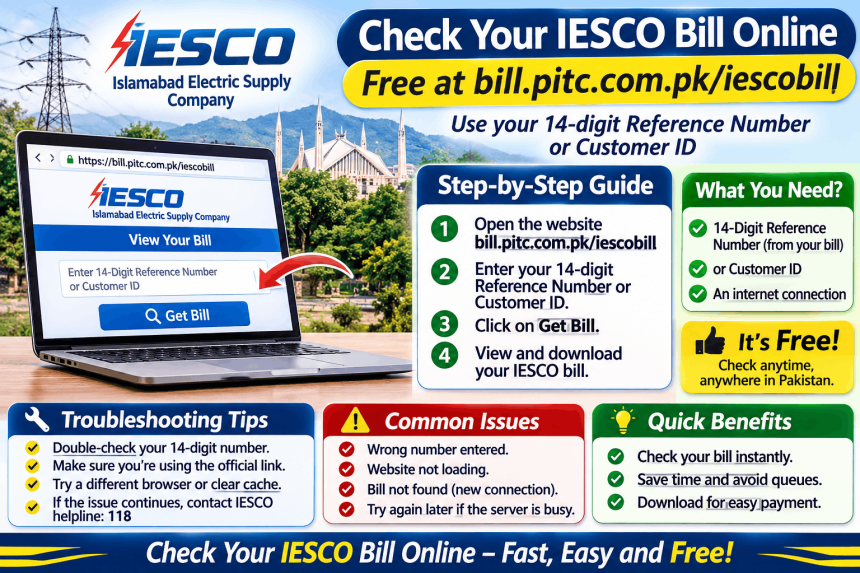
You can check your IESCO electricity bill online for free at the official PITC portal, bill.pitc.com.pk/iescobill. All you need is your 14-digit reference number or your Customer ID, both printed on any old bill. No login, registration, or CNIC is required . This guide walks through the exact steps, explains what each part of your bill means, and covers what to do if something goes wrong.
The official IESCO bill check page
IESCO does not run its own separate bill search. Its website links directly to the Power Information Technology Company (PITC) web bill page, which serves 11 electricity distribution companies across Pakistan .
| Item | Detail |
|---|---|
| Official page | bill.pitc.com.pk/iescobill |
| Page heading | IESCO Web Bill, Powered by PITC |
| What you need | 14-digit reference number or Customer ID |
| Cost | Free |
| Login required | No |
Make sure you are on the correct page. The PITC homepage lists all distribution companies, so select IESCO and not a neighbouring company like GEPCO or PESCO .
Step-by-step: how to check your IESCO bill
-
Open the official page. Go to bill.pitc.com.pk/iescobill. Type the address yourself rather than clicking links from social media or messaging apps .
-
Keep “Reference No” selected. The page defaults to this option. If you have your Customer ID instead, switch to that option .
-
Enter your 14-digit reference number. Type it with no spaces. Find it printed near the top of any old IESCO bill, usually next to the word “Reference” .
-
Select U or R. In the small box next to the number, choose U for Urban or R for Rural, matching what is printed on your bill. The page defaults to U .
-
Press Search. Your latest bill opens on screen.
-
Print or save. You can print the duplicate bill or save it as a PDF for your records .
What if you only have your Customer ID?
The official page accepts a 10-digit Customer ID as an alternative to the reference number . Switch the search option to “Customer ID” and enter the number. Your bill will open, and you can note down the 14-digit reference number from the top for future use.
Understanding your IESCO bill
Once your bill loads, here is what the key sections mean.
| Section | What it shows |
|---|---|
| Reference Number | Your 14-digit account identifier. It stays the same every month (unless you have an AMI meter that was re-batched) |
| Consumer ID | A separate 10-digit identifier printed below the reference number on newer bills |
| Units Consumed | The electricity you used this billing cycle |
| Due Date | The last date to pay without a late payment surcharge. Per IESCO’s Consumer Service Manual, the due date is within 15 days of the bill issue date |
| Fuel Price Adjustment (FPA) | A variable charge set by NEPRA that changes each cycle based on fuel costs |
| Quarterly Tariff Adjustment (QTR) | Another NEPRA-set adjustment that can raise or lower your bill independent of your usage |
If your bill seems higher than usual despite similar consumption, check the Adjustments section for FPA or QTR changes before assuming there is an error .
Common problems and how to fix them
The page says “record not found”
Check that you selected the correct company (IESCO, not another DISCO). Confirm your reference number is exactly 14 digits with no spaces. If your meter was recently replaced or you have an AMI meter in Rawalpindi, your reference number may have changed .
The bill has not updated
Bills typically update after the 5th of each month. If you are checking on the 3rd or 4th, the new bill may not be uploaded yet. Try again in a few days .
I have lost my reference number
You cannot check your bill online using only your CNIC, name, or meter number. The official portal does not offer that search option . Here is what to do instead:
-
Look through old records. Any old bill, payment receipt, bank app history, or WhatsApp photo will have the reference number .
-
Check your payment apps. JazzCash, Easypaisa, and banking apps often save the biller with the reference number in transaction history .
-
Call IESCO helpline 118. Keep the connection holder’s name, full address, and your CNIC ready. Staff can help you retrieve the number .
-
Visit your sub-division office. Take your CNIC, the full address, and a photo of the meter if possible. Staff can print a duplicate bill with the reference number .
I have an AMI meter in Rawalpindi and my old number stopped working
In July 2026, IESCO reorganised billing batches for AMI smart meters in Rawalpindi City and Rawalpindi Cantt circles. If your old reference number does not work, convert it using IESCO’s Search Reference Number page at iesco.com.pk/search-reference-number. Enter your old 14-digit number (no letter at the end) to get the new one .
This change did not affect consumers in Islamabad, Attock, Chakwal, or Jhelum circles, or Rawalpindi consumers without AMI meters .
Safety: avoid fake bill-check websites
Many third-party websites offer to check your IESCO bill. Some are harmless, but others collect your personal data . Follow these rules:
-
Use only the official PITC page. The address should end in pitc.com.pk .
-
Never enter your CNIC, bank details, or OTP on a bill-check site. A reference number is the only thing needed .
-
Do not pay anyone to check your bill. The official service is free .
-
Ignore sites promising “bill by CNIC” or “bill by name.” No official IESCO portal offers this search, and sites claiming otherwise cannot deliver it .
How to pay after checking
After viewing your bill, you can pay through:
-
Bank apps: HBL, UBL, Meezan, and other major banks have a utility bill payment option using your reference number .
-
JazzCash and Easypaisa: Both wallets support IESCO bill payment .
-
Bank branch or post office: Take your printed bill to any commercial bank branch or post office in your district .
-
NADRA e-Sahulat kiosks: Authorised to collect electricity bills .
Keep your payment receipt until the next bill shows the payment was received.
Frequently Asked Questions
What do I need to check my IESCO bill online?
You need either your 14-digit reference number or your 10-digit Customer ID. Both are printed on any IESCO bill. No CNIC, login, or registration is required .
Can I check my IESCO bill by CNIC?
No. The official IESCO/PITC bill portal does not accept CNIC numbers for bill search. You must use your reference number or Customer ID. If you have lost your reference number, call 118 or visit your sub-division office with your CNIC and address .
Is checking my IESCO bill online free?
Yes. Viewing, printing, and downloading your bill from the official PITC page is completely free. No payment is required to check your bill .
Why is my IESCO bill higher than usual?
Check the Adjustments section of your bill. Fuel Price Adjustment (FPA) and Quarterly Tariff Adjustment (QTR) are NEPRA-set charges that can change each cycle regardless of your usage. If neither explains the increase, compare the meter reading on the bill with your actual meter .roved, hosted on iesco.com.pk).